RGB 4-Pin LED Strip Splitter Cables

Share it:

RGB 4-Pin LED Strip Splitter Cables

Perfectly synchronize multiple RGB LED strips with our RGB 4-Pin Splitter Cable. This essential accessory takes the signal from a single controller and splits it into 2, 3, or 4 identical outputs. Ensure every strip displays the exact same color and lighting effect simultaneously for a seamless, professional installation.

Price range: $2.00 through $3.00

Description

RGB 4-Pin Splitter Cable: The Key to Synchronized Color Control


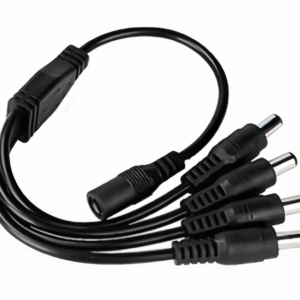
An RGB 4-Pin Splitter Cable is the definitive solution for controlling multiple, separate RGB LED strip lights from a single controller. If your project requires perfect color synchronization across different areas—such as backlighting a TV and nearby shelves, or installing RGB strips on opposite sides of a room—this splitter is essential. The RGB 4-Pin Splitter Cable takes the complete 4-pin signal (Red, Green, Blue, and 12V+) from your RGB controller and duplicates it flawlessly across two, three, or four outputs. This guarantees that every connected LED strip will perform in perfect harmony, displaying the same colors, patterns, and brightness levels at the exact same time.


Why You Need an RGB 4-Pin Splitter Cable


While a DC splitter can distribute power, it cannot handle the complex color signals of an RGB system. That’s where this specialized splitter comes in.

  • Perfect Color Synchronization: This is the primary benefit. Without a splitter, you would need separate controllers for each strip, which would be impossible to sync perfectly. This cable ensures every strip works in unison.
  • Enables Complex Layouts: Install strips in different, non-contiguous locations without having to run one extremely long LED strip between them. You can run extension cables from each output of the splitter to your desired locations.
  • Clean and Organized Wiring: Centralize your control by running one cable from your controller to the splitter, and then neatly branching out to your various lighting zones. This is much cleaner than running multiple long cables back to a single point.
  • Plug-and-Play Installation: The 4-pin connectors are designed for a secure, easy connection to most standard RGB controllers and LED strips.


Installation and Setup


Using your RGB 4-Pin Splitter Cable is incredibly simple.

  1. Connect to Controller: Plug the female end of the splitter cable directly into the 4-pin male output of your RGB LED Controller.
  2. Align the Arrows: IMPORTANT: All 4-pin connectors have a small arrow molded into the plastic. You must ensure the arrow on the splitter’s female plug aligns with the arrow on the controller’s male plug.
  3. Connect Your Strips: Plug the male ends of the splitter into the female 4-pin inputs of your RGB LED Strips or 4-pin extension cables. Again, make sure the arrows on these connections are aligned.
  4. Power On and Test: Turn on your controller and test the strips. All connected segments should now light up and respond to the controller’s commands as one synchronized system.

To learn more about how RGB color is created in LEDs, you can read this guide to RGB color.

Applications for RGB Splitters


The RGB 4-Pin Splitter Cable is perfect for ambitious color-changing projects:

  • Home Theater Lighting: Synchronize the backlighting of your television, speakers, and entertainment console.
  • Gaming Setups: Create an immersive environment by splitting the signal to light up your desk, monitor, and PC case together.
  • Retail Displays: Ensure all shelves and display cases in a section change color in perfect harmony to attract customers.
  • Under-Cabinet and Kick-Plate Lighting: Run two or more separate strips in a kitchen from one controller for a cohesive look.


Frequently Asked Questions (FAQs)


Q: Can I use this with single-color or RGBW (5-pin) strips? A: No. This splitter is specifically designed for 4-pin RGB strips only. It will not work with 2-pin single-color strips or 5-pin/6-pin RGBW/RGBCCT strips.

Q: Will splitting the signal make the lights dimmer? A: No, the splitter only duplicates the control signal. However, just like with a DC Power Splitter, you must ensure your power supply has enough wattage to power the total length of all connected strips combined.
Additional information

Number of Outputs

2-Way, 3-Way, 4-Way

Pin Count

4-Pin

Reviews

There are no reviews yet.

Only logged in customers who have purchased this product may leave a review.

Order the Product

Description

RGB 4-Pin Splitter Cable: The Key to Synchronized Color Control


An RGB 4-Pin Splitter Cable is the definitive solution for controlling multiple, separate RGB LED strip lights from a single controller. If your project requires perfect color synchronization across different areas—such as backlighting a TV and nearby shelves, or installing RGB strips on opposite sides of a room—this splitter is essential. The RGB 4-Pin Splitter Cable takes the complete 4-pin signal (Red, Green, Blue, and 12V+) from your RGB controller and duplicates it flawlessly across two, three, or four outputs. This guarantees that every connected LED strip will perform in perfect harmony, displaying the same colors, patterns, and brightness levels at the exact same time.


Why You Need an RGB 4-Pin Splitter Cable


While a DC splitter can distribute power, it cannot handle the complex color signals of an RGB system. That’s where this specialized splitter comes in.

  • Perfect Color Synchronization: This is the primary benefit. Without a splitter, you would need separate controllers for each strip, which would be impossible to sync perfectly. This cable ensures every strip works in unison.
  • Enables Complex Layouts: Install strips in different, non-contiguous locations without having to run one extremely long LED strip between them. You can run extension cables from each output of the splitter to your desired locations.
  • Clean and Organized Wiring: Centralize your control by running one cable from your controller to the splitter, and then neatly branching out to your various lighting zones. This is much cleaner than running multiple long cables back to a single point.
  • Plug-and-Play Installation: The 4-pin connectors are designed for a secure, easy connection to most standard RGB controllers and LED strips.


Installation and Setup


Using your RGB 4-Pin Splitter Cable is incredibly simple.

  1. Connect to Controller: Plug the female end of the splitter cable directly into the 4-pin male output of your RGB LED Controller.
  2. Align the Arrows: IMPORTANT: All 4-pin connectors have a small arrow molded into the plastic. You must ensure the arrow on the splitter’s female plug aligns with the arrow on the controller’s male plug.
  3. Connect Your Strips: Plug the male ends of the splitter into the female 4-pin inputs of your RGB LED Strips or 4-pin extension cables. Again, make sure the arrows on these connections are aligned.
  4. Power On and Test: Turn on your controller and test the strips. All connected segments should now light up and respond to the controller’s commands as one synchronized system.

To learn more about how RGB color is created in LEDs, you can read this guide to RGB color.

Applications for RGB Splitters


The RGB 4-Pin Splitter Cable is perfect for ambitious color-changing projects:

  • Home Theater Lighting: Synchronize the backlighting of your television, speakers, and entertainment console.
  • Gaming Setups: Create an immersive environment by splitting the signal to light up your desk, monitor, and PC case together.
  • Retail Displays: Ensure all shelves and display cases in a section change color in perfect harmony to attract customers.
  • Under-Cabinet and Kick-Plate Lighting: Run two or more separate strips in a kitchen from one controller for a cohesive look.


Frequently Asked Questions (FAQs)


Q: Can I use this with single-color or RGBW (5-pin) strips? A: No. This splitter is specifically designed for 4-pin RGB strips only. It will not work with 2-pin single-color strips or 5-pin/6-pin RGBW/RGBCCT strips.

Q: Will splitting the signal make the lights dimmer? A: No, the splitter only duplicates the control signal. However, just like with a DC Power Splitter, you must ensure your power supply has enough wattage to power the total length of all connected strips combined.

Additional information

Number of Outputs

2-Way, 3-Way, 4-Way

Pin Count

4-Pin

Reviews

There are no reviews yet.

Only logged in customers who have purchased this product may leave a review.